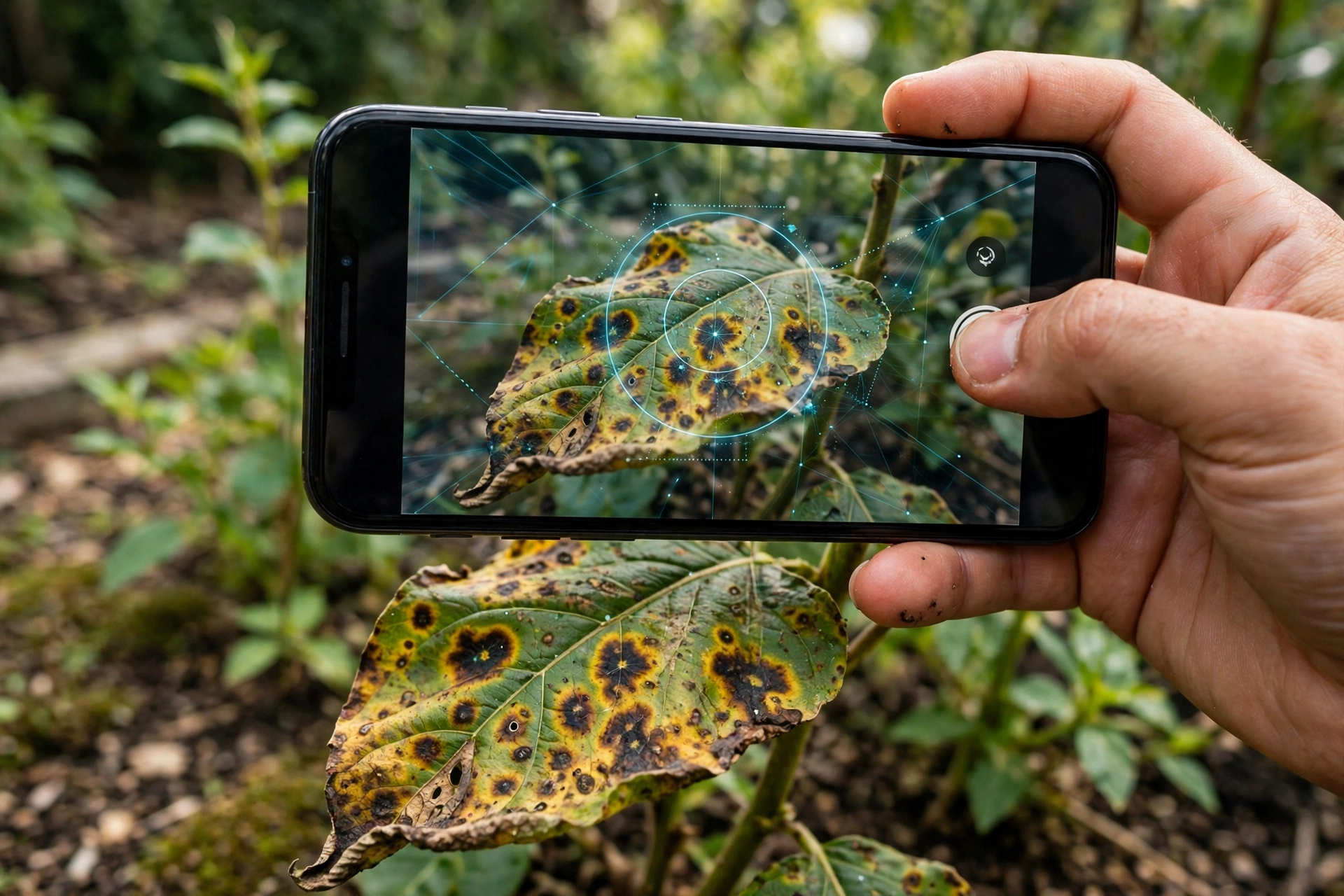
A few years ago, diagnosing a plant disease meant flipping through books, asking at a garden centre, or waiting for an expert to visit. Today, you can upload a photo of a leaf and get a likely identification in seconds. AI plant diagnosis is fast, free in many cases, and increasingly accurate — but it is not magic, and it works far better when you know how to use it well.
This guide explains how AI leaf diagnosis works, how to take photos that give the best results, how to interpret what the AI tells you, and when to trust it, double-check it, or ask a human expert instead.
How AI Plant Diagnosis Works
AI plant identification tools are trained on thousands — sometimes millions — of labelled photos of healthy and diseased plants. When you upload a photo, the AI compares the patterns it sees — spot shape, colour, texture, leaf shape, and distribution — with patterns it has learned, and returns the closest matches, often with a confidence score or a shortlist.
That is powerful, but it has limits. The AI only sees what is in the photo. It cannot smell the soil, feel the roots, check the weather, or know your plant's history. It may also be less accurate for rare diseases, unusual species, or photos that are blurry, dark, or taken from too far away. Think of it as a very knowledgeable first opinion, not a laboratory test.
Step-by-Step: Get the Best AI Result
Step 1: Photograph the whole plant first
Take a wide photo showing the whole plant, its pot or bed, and the pattern of damage. This helps you — and any expert you later consult — understand whether the problem is local or widespread.
Step 2: Take a clear close-up of the leaf
Fill the frame with one or two affected leaves, in natural daylight, in sharp focus. Include both the damaged area and some healthy tissue for comparison. Avoid flash, harsh shadows, and extreme zoom, which can blur details.
Step 3: Photograph the underside and the stem
Many diseases and pests show differently on the leaf underside. Take a photo of the underside, plus a photo of the stem, bark, or fruit if they are affected. More angles mean a better match.
Step 4: Add context the AI cannot see
Note the plant species if you know it, when the symptoms started, recent weather, watering, fertiliser, and whether nearby plants are affected. If the tool allows a description, add it. If not, keep it in mind when you read the result.
Step 5: Upload and read the result carefully
Upload your best photo first. Read the top matches, not just the first one, and check whether the description fits your plant, season, and symptoms. A high-confidence match that does not fit the context is less useful than a lower-confidence match that does.
Common Mistakes
- Uploading a single blurry photo. The AI needs detail. One blurry leaf from two metres away will give a poor result.
- Trusting the first match blindly. AI can be confident and wrong, especially for lookalike diseases. Always check the description.
- Ignoring context. A disease that is common in summer may be unlikely in winter; a tomato disease will not affect a rose.
- Treating based on AI alone. AI is guidance, not a prescription. Check local rules, label instructions, and expert advice before treating, especially on food crops.
- Not keeping a record. Save the photo and the result with a date, so you can track whether the problem is spreading or improving.
What Good AI Tools Do Well — and Where They Struggle
AI tools are at their best with common diseases on common plants photographed clearly in good light. Powdery mildew on a rose, early blight on a tomato, black spot on a rose leaf — these have been photographed thousands of times, and a good tool will usually name them correctly. They are less reliable with rare diseases, unusual species, new varieties, and problems that are mostly below ground, such as root rot or vascular wilt, where the leaf symptoms are vague and shared by many causes. They also struggle when a plant has two problems at once, for example aphids plus a virus, or drought plus mildew. If the tool gives you a long list of very different possibilities, or a low confidence score, treat that as a signal to gather more evidence: take more photos, check the soil and roots, and ask a human expert. The tool is not failing — it is telling you the photo alone does not contain enough information.
Building Your Own Photo Record
The most useful habit after using an AI tool is to keep the evidence. Save each photo with the date, the plant name, the AI suggestion, and a note of what you actually did and what happened next. Over a season, this becomes a personal reference library: you will recognise the same disease faster next time, you will know which treatments worked in your garden, and you will be able to show an expert a clear history instead of a single blurry leaf. A simple folder on your phone, or a notebook with printed photos, is enough. Review it in winter, when the garden is quiet, and you will see patterns — which plants struggled, which beds stayed wet, and what you want to change next year — that no single diagnosis could show you.
FAQ
How accurate is AI plant disease diagnosis? Accuracy varies by tool, plant, and photo quality. For common diseases on common plants with clear photos, AI can be very helpful. For rare diseases or poor photos, accuracy drops. Always verify important decisions with a human expert.
Can AI identify a disease from one leaf? Sometimes, but several photos — whole plant, close-up, underside, and stem — give a much more reliable result. The more information you provide, the better the match.
Is AI diagnosis a replacement for an arborist or plant clinic? No. AI is a useful first step for common problems, but a local expert can inspect the plant in person, test soil, and consider local diseases and conditions that AI may not know.
Does AI work for houseplants as well as garden plants? Yes, and houseplants are often a good case for AI diagnosis, because their problems are usually visible on the leaves and the plants are easy to photograph indoors in good light. Remember to photograph the underside of the leaf and the soil surface too, and note your watering routine.
Should I pay for a plant diagnosis app? Free tools are often enough for common problems. Paid tools may offer a larger database or expert review, which can help with unusual plants or valuable trees. Whichever you use, the same rules apply: good photos, added context, and verification before treating.
Can AI diagnose a disease from a photo of the whole garden? Not reliably. A wide garden photo is useful for context, but the AI needs a clear close-up of the affected leaf to see spot shape, colour, and texture. Always upload a close-up as your main photo, and add the wide shot for context if the tool allows more than one image.
Conclusion
AI diagnosis from leaf photos is a practical, fast way to get a likely answer and a starting point for action — if you give it good photos, add context, read the results critically, and verify before treating. Used that way, it turns a worrying yellow leaf into a manageable problem, and helps you learn to spot trouble earlier next time. The best results come from combining AI speed with human judgement.
Try it: Try the free Plant Disease Identifier on aitreeidentier.site — upload a clear photo of the affected leaf for instant guidance.
Safety disclaimer: Never eat or use a plant, or treat a disease, based on AI identification alone. AI results are guidance only — consult a local expert before applying treatments, especially on food crops or near children and pets.